Post ·
Two AI Sessions, One Repo: What Broke
AI sessions sharing one git working copy collide in five ways, from vanished drafts to a stuck lock file. Here is the rule behind each.
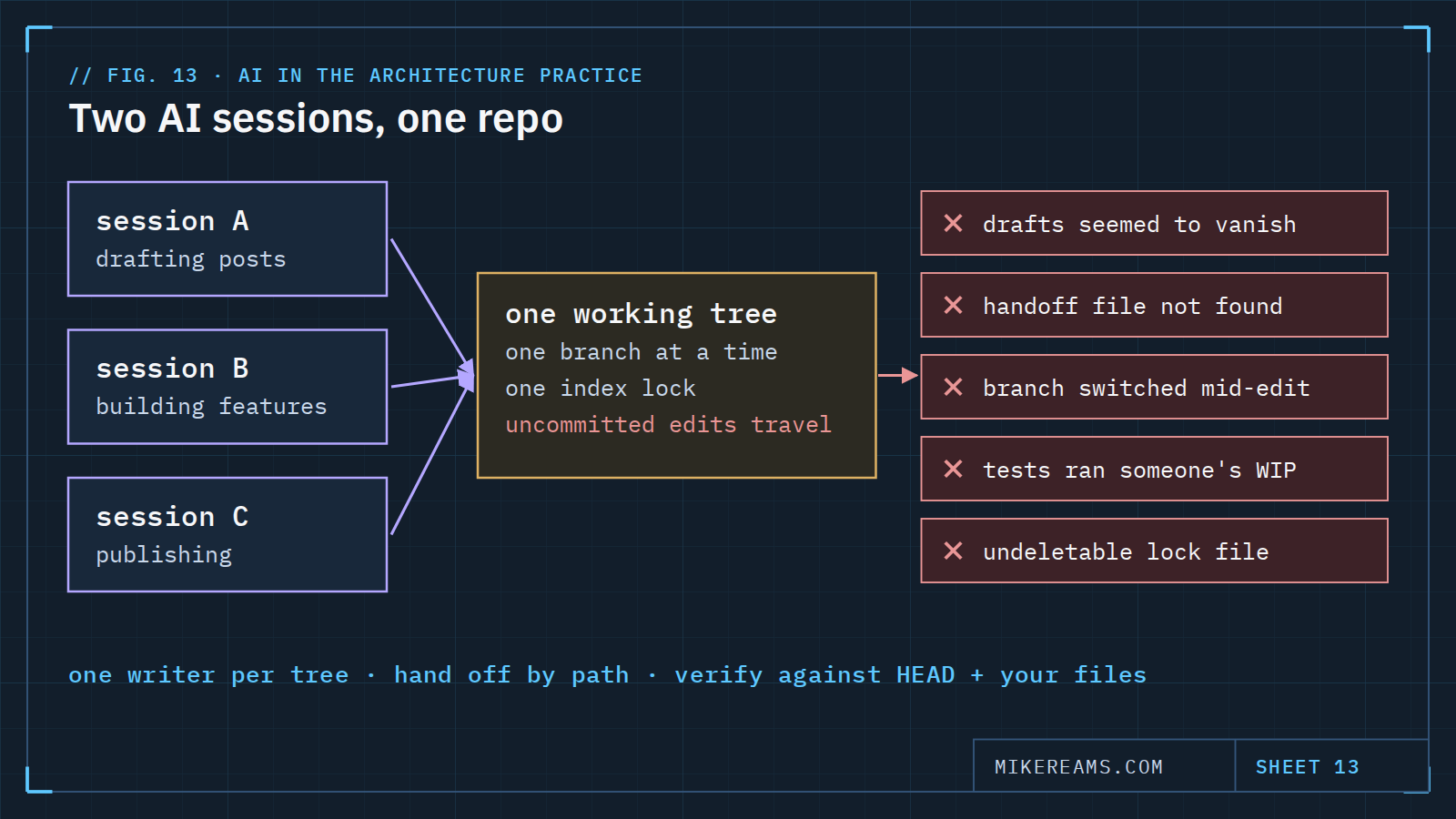
I run several AI sessions against the same projects: one drafting posts for this site, one building site features, one publishing on a weekly cadence. They share one working copy on one machine, and git is the only thing coordinating them. Over a couple of days that setup broke in five distinct ways. None of them lost work. All of them cost time, and every one has a simple rule behind it.
1. The drafts that vanished
One session wrote eight draft posts as new, uncommitted files. A second session found them, committed them to its own branch, and switched the working copy to a different branch. When the first session looked again, its drafts were gone from the folder. They were safe in a commit, but it took a search of history to prove it, and redrafting them would have thrown away another session's edits.
- Rule: before recreating anything that disappeared, search history first. git log --all -- <path> answers "where did it go?" in one line.
2. The handoff nobody could find
Because the target branch was not checked out, one session handed its changes over as a patch file named so that git would ignore it. The receiving session looked in Downloads, on the Desktop and in a temp folder — everywhere except the repository — and reported the patch missing. By then the changes had already been applied anyway.
- Rule: handoffs go to one agreed location, named by full path in the message, and "I can't find it" is checked by content, not by search. A matching hash settles it.
3. The branch that moved under live edits
Uncommitted changes travel with the working copy, not the branch. When one session switched branches while another had edits in flight, those edits came along to a branch they did not belong on. Nothing broke, but the next commit nearly carried somebody else's half-finished feature.
- Rule: one writer per working copy at a time. When work genuinely needs to run in parallel, give each session its own worktree.
4. Testing someone else's half-finished work
Running the test suite in a shared working copy tests everything in it, including another session's feature that was mid-change. A failure there tells you nothing about your own work.
- Rule: verify against the last commit plus only your own files. Export the committed tree, copy your changed files on top, and run the suite there. The result is about your change and nothing else.
5. The lock file nobody could delete
One session reached the repository through a file bridge that could create files but not delete them. A git command created its usual lock file, could not remove it, and left it behind — which blocked every later git command, including mine at my own keyboard.
- Rule: sessions working through a restricted bridge read git and do not change it. They hand the person the exact commands instead. Reading is safe. Writing through a filesystem you do not fully control is not.
Git coordinates commits. It does not coordinate people — or sessions — sharing one working copy.
What I run now
The same principles behind single-writer resume files apply to the repository itself: one writer at a time, explicit handoffs, and evidence over assumption.
Copy this: multi-session rules
## Multiple AI sessions, one repository
- One writer per working copy. Parallel work gets its own worktree:
  git worktree add ../<repo>-<task> -b <branch>
- Before recreating anything that "disappeared", search history:
  git log --all --oneline -- <path>
- Handoffs: one agreed folder, full path in the message, verify by
  content hash, never by "I couldn't find it".
- Never switch branches while another session has uncommitted edits.
- Verify your change against the last commit + only your own files:
  git archive HEAD | tar -x -C <scratch>; copy your files; run tests.
- Sessions on a restricted file bridge: read git only. Hand the human
  the mutating commands (reset, switch, commit, push).
- Stage by explicit path. Never "git add -A" in a shared working copy.