Post ·
The Field That Isn't There
A field can accept every write, return success and not exist. How phantom fields get into CMDB loads, and the partition test that exposes them.
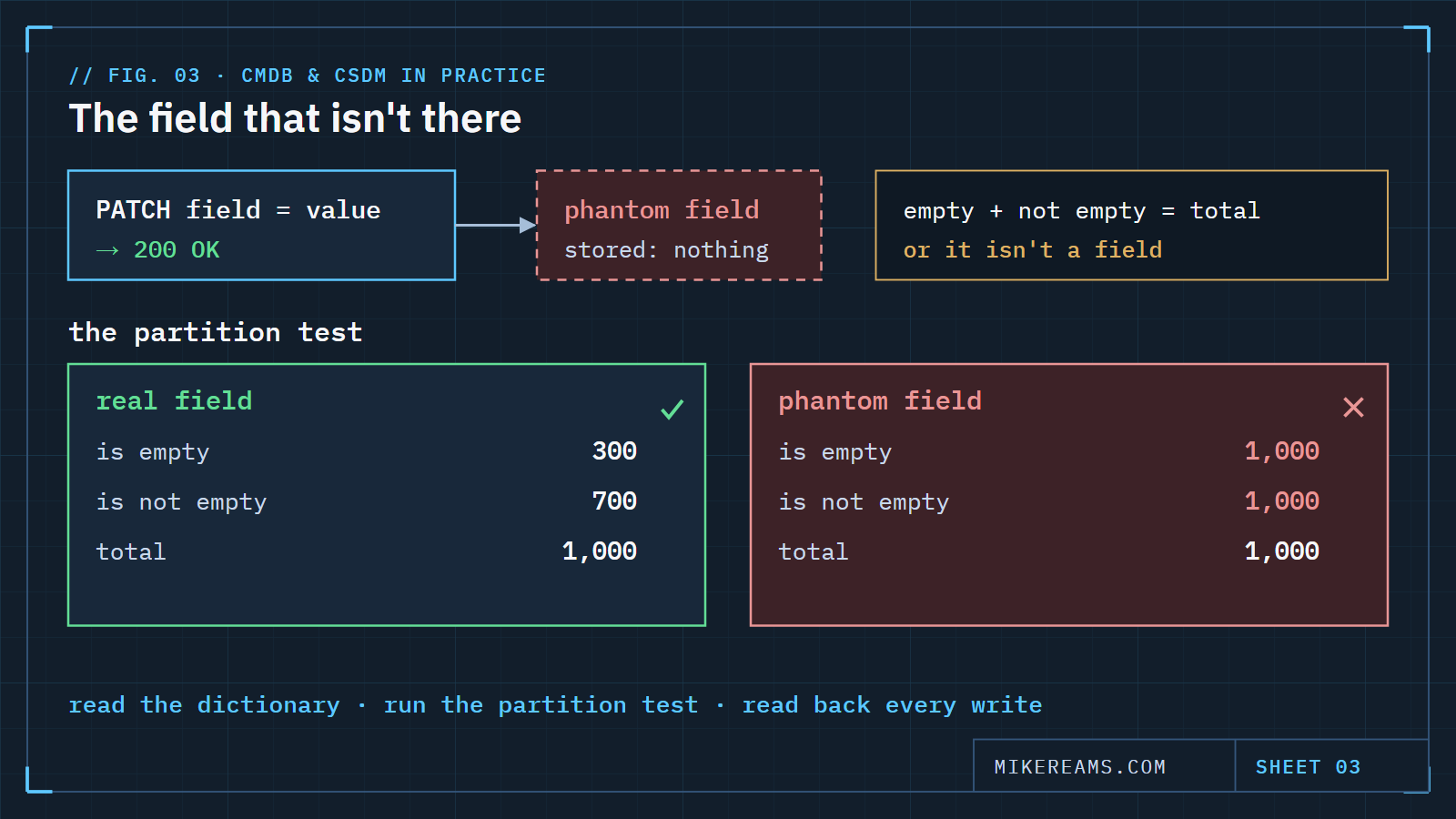
Here is a field that looks perfect: the right name, sensible values in your spreadsheet, and your scripts write to it without complaint. Every update comes back successful. Then a report built on it shows nothing changed, ever, for anyone.
The field does not exist. Not as a column the platform reads, anyway. It exists in your notes, your export template and your integration mapping. The platform has been politely accepting the writes and discarding them, like a very well-mannered black hole.
How a phantom field gets in
- Names drift. The framework calls it one thing — a TIME disposition, say — and the platform stores it under a different name with different values. Someone maps the framework name, and it sticks.
- APIs are forgiving. Many APIs return success and store nothing when you write to a field the table does not have. No error, no warning. Forgiveness is not a feature when you are trying to find out you are wrong.
- Exports flatter you. Your own export template includes the column because you added it. It round-trips through your spreadsheet just fine. It never touched the system.
A field that accepts every write and returns every row is not a field. It's a suggestion box.
The tell
A real field partitions the table. Some rows are empty, some are not, and the two counts add up to the total. A phantom field fails that test in a very specific way: filter for "is empty" and you get every row; filter for "is not empty" and you also get every row. The platform is ignoring an unknown condition, not evaluating it.
That one check takes seconds and has saved me from building a quarter's worth of reporting on air.
Check before you trust a column
- Read the dictionary, not the template. Confirm the field exists on the table you are writing to — and on the exact class, not just a parent or a sibling.
- Run the partition test. Empty count plus not-empty count must equal the total, and neither should equal the total on its own unless that is genuinely true.
- Derive valid values from use. If the choice list is not readable to you, tally the distinct values already in use. Write the raw value, not the label, and expect the label on read-back.
- Read back every write. A write you did not read back is a hope. Compare what you sent with what is stored, field by field.
- Keep a translation table. When your framework's vocabulary differs from the platform's — and it will — record the mapping once, in one place, and make every loader use it.
Why it matters beyond the data
A disposition is a decision, and decisions get audited. If the decision was written to a phantom field, the record of it is gone, and nobody knew it was gone until someone asked. The cost is not the bad report. It is the meeting where you explain that six months of governance lived in a column that was never there.
Copy this: the phantom-field check
PHANTOM FIELD CHECK - run before any load or report on <table>.<field>
1. Exists?   field is defined on <table> (exact class, not parent/sibling)
2. Partition test:
     total     = count(<table>)
     empty     = count(<table> where <field> IS EMPTY)
     not_empty = count(<table> where <field> IS NOT EMPTY)
     PASS if empty + not_empty == total AND NOT (empty == total == not_empty)
     FAIL (phantom) if empty == total AND not_empty == total
3. Values:   valid raw values = distinct values already in use
             (write raw value, expect display label on read-back)
4. Write:    update 1 record -> read it back -> compare field by field
5. Mapping:  framework name/value -> platform field/raw value, one table,
             used by every loader