Post ·
Five ServiceNow API Calls That Return Success and Store Nothing
Five ServiceNow Table API calls report success yet store nothing: currency fields, ampersands in references, bad choice values, class filters, partial access.
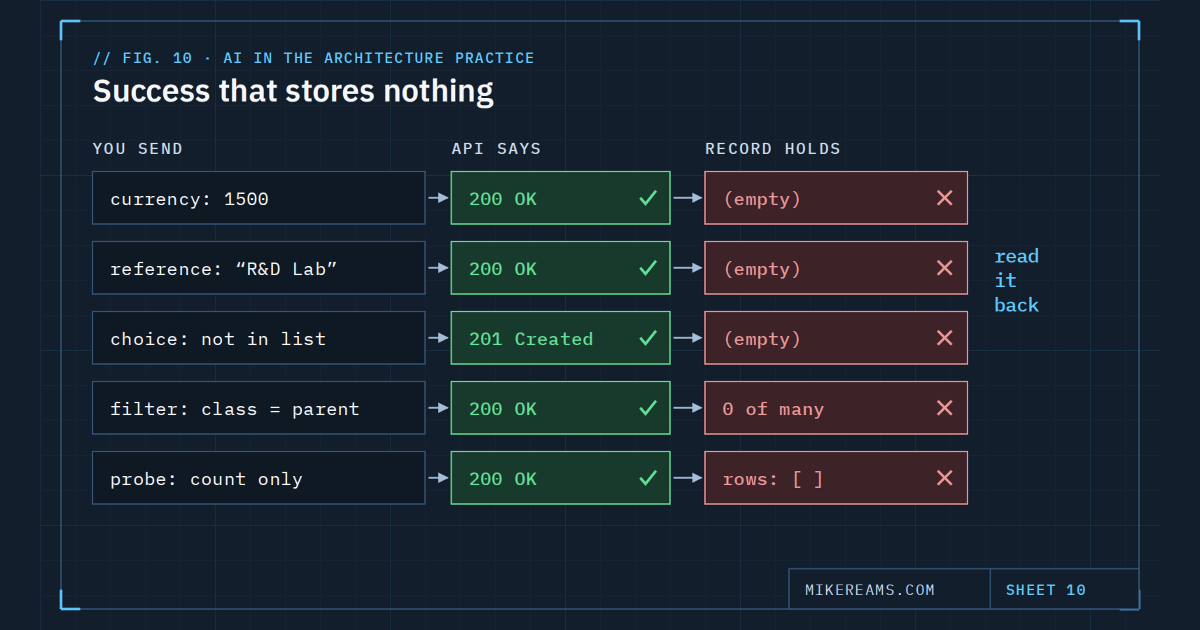
Most API failures are loud: an error code, a stack trace, a red row. These are the quiet ones. Each returned a success code while the data I cared about ended up empty. I hit all five while building a console against a ServiceNow CMDB. Instances are configured differently, so treat these as things to test on yours, not laws of the platform.
1. A currency field wants a currency
Set a currency field with a bare number, like 1500, and the response can be a 200 with the field stored empty. Send the currency code and the amount together — USD;1500 — and read the field back to confirm it holds what you sent.
2. An ampersand can break a reference
Setting a reference field by its display value is convenient: you send a name instead of a record ID. With display-value input enabled, a name containing an ampersand, such as "Research & Development", returned 200 and stored nothing. Set references by sys_id. Look the ID up first if you have to.
3. An invalid choice is accepted, then discarded
A create with a choice value that is not on the field's list returned 201 Created, and the field was stored empty. Labels shown in the UI can also differ from the values stored underneath. Use the stored value, taken from existing records, and read the field back after the first write.
4. A parent-class filter misses its children
Querying a parent table returns records of its child classes as well. Filtering on sys_class_name equal to that parent does not: it is an exact match. When most records are stored as a subclass — Application Services created by discovery are a common case — the filter returns almost nothing, and the result reads like a data-quality crisis that is not there. Query the parent table itself, or filter with sys_class_nameIN and list the child classes.
5. Access has four states, not two
When permissions are partial, a quick probe lies. I have seen four states:
- Readable. Counts work, rows return, filters work.
- Count-only. The aggregate endpoint returns a count, but a table read returns an empty list.
- Readable, but not filterable. A bare read returns 200. Add any query and it returns 403. You can page through millions of rows but cannot filter to the twelve you want.
- Denied. A 403 on everything.
A 400 Invalid table is a fifth answer that looks like the others and means something else: a spelling mistake, not a permission. A probe that only counts, or only does a bare read, will report access you do not have. Probe with a real filtered query and a row limit, and record which of the four states you found.
A success code tells you the request was accepted. Only a read-back tells you what was stored.
The common fix
One habit covers all five: after any write, re-read the specific field and compare it to what you sent. Before trusting an empty result, ask whether the query could have returned anything at all. It is the same discipline as not trusting a clean dry run, applied one field at a time.
Copy this: rules for an agent that calls the Table API
## ServiceNow Table API rules
- Currency: write "USD;<amount>", never a bare number. Read it back.
- References: set by sys_id, not by display value.
- Choices: use the stored value from existing records, not the UI label.
  A 201 does not mean the value was kept. Read it back.
- Class filters: query the parent table, or use
  sys_class_nameIN<parent>,<child classes>. Never sys_class_name=<parent>.
- Access probes: test with a filtered query and sysparm_limit, not a count
  or a bare read. Record which of the four access states you found.
- "400 Invalid table" is a naming error, not a permission finding.
- After every write, re-read the field. Treat a success code as a claim.