DGM · Technical Architecture
Azure Virtual Desktop at Scale
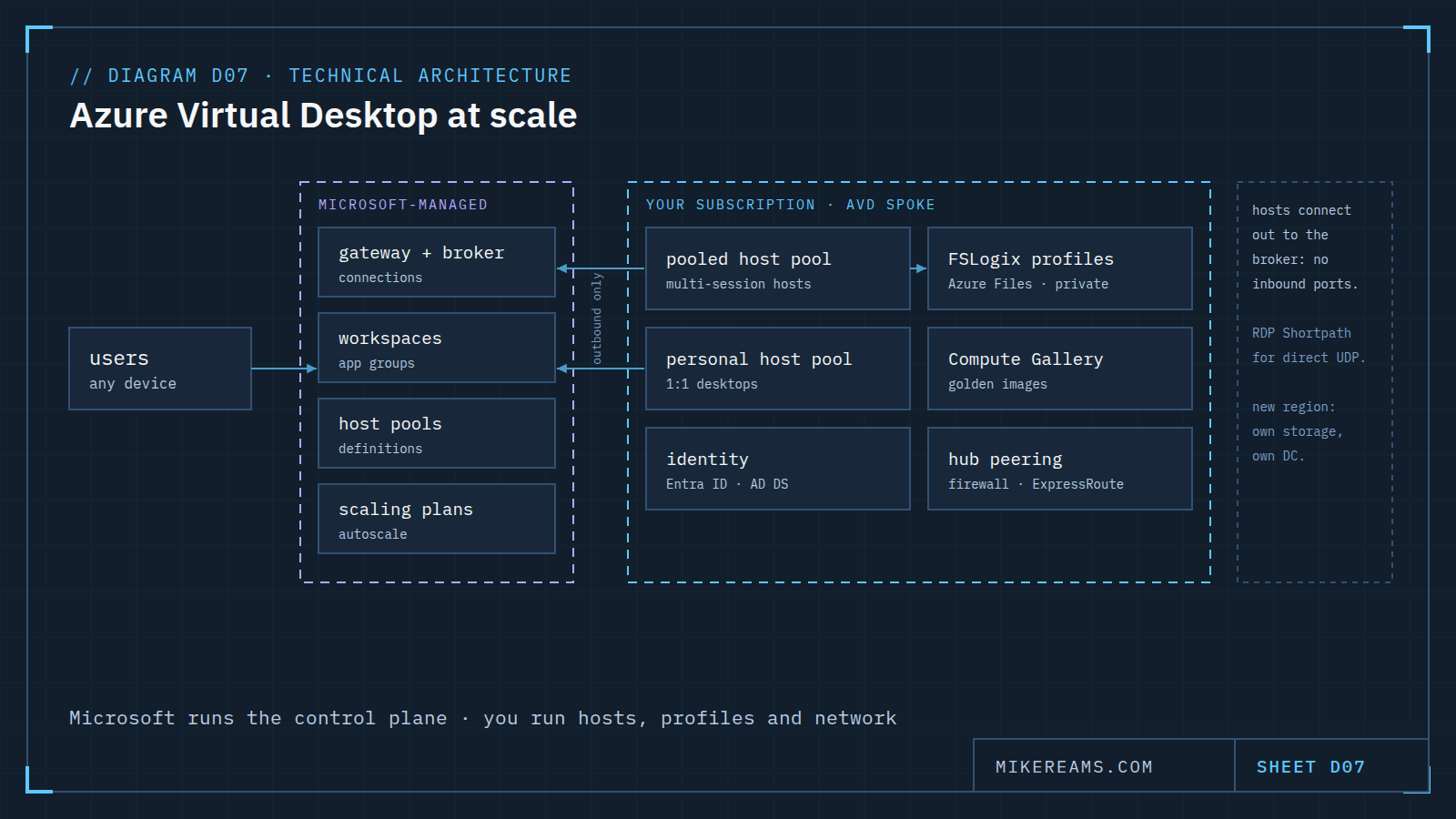
Azure Virtual Desktop splits a Microsoft-managed control plane from the host pools, profiles, images and network you run in your own subscription.
What it is
Azure Virtual Desktop delivers Windows desktops and apps from Azure. The split that shapes every design decision is responsibility: Microsoft runs the service that brokers connections, and you run the session hosts, user profiles, images, identity and network in your own subscription.
What Microsoft runs
The gateway and connection broker, workspaces and application groups, host pool definitions and the scaling orchestration. You configure them; you do not patch or host them.
What you run
- Session hosts in pooled host pools (many users per multi-session host) or personal ones (one desktop per user).
- FSLogix profile containers on Azure Files or Azure NetApp Files, reached over private endpoints.
- Golden images in Azure Compute Gallery, so every new host starts identical.
- Identity: Microsoft Entra ID, with Active Directory Domain Services where the hosts need it.
- Network: an AVD spoke peered to the hub, which holds the firewall and the connection to on-premises.
Network rules worth keeping
Session hosts connect outbound to the service, so no inbound ports are opened to them. RDP Shortpath can carry sessions over direct UDP where the network allows it. Everything else follows the hub-spoke pattern.
Scaling out
- Scaling plans add and remove hosts on a schedule and with demand; drain mode moves users off a host before it is removed.
- A second region gets its own non-overlapping address space, its own profile storage and ideally its own domain controller.
- Assign each user to one region, so profiles never split between two copies.
Based on Azure Virtual Desktop for the enterprise (Azure Architecture Center). Drawn for this site; no client or employer material.