DGM · Technical Architecture
Azure Hub-Spoke Network
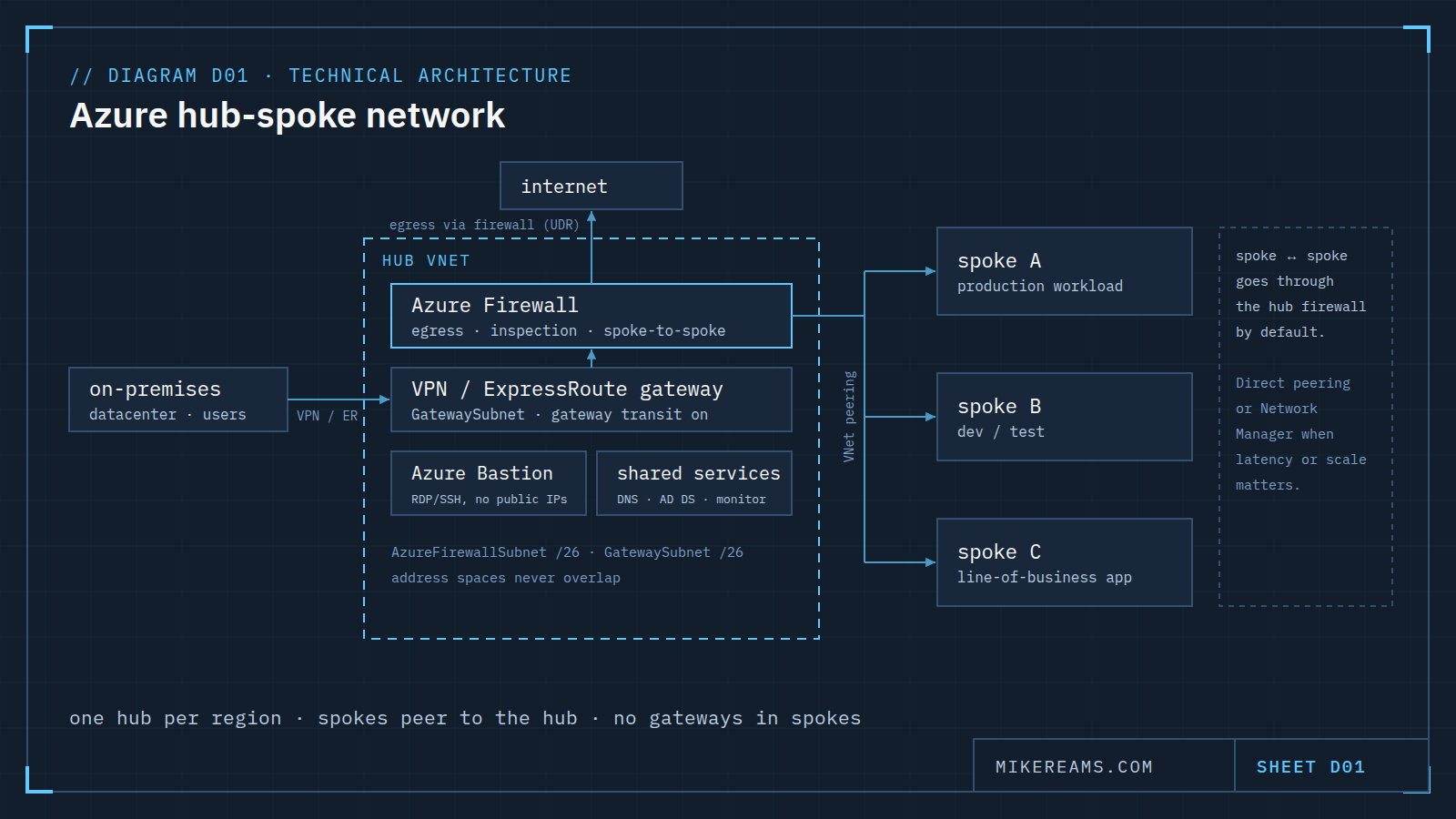
A hub-spoke network puts the firewall, gateway and shared services in one hub VNet and peers each workload spoke to it instead of to each other.
What it is
A hub-spoke network is the default enterprise network shape in Azure. One hub virtual network holds everything every workload shares: the firewall, the gateway to on-premises, remote administration and shared services. Each workload gets its own spoke virtual network, peered to the hub. Spokes stay isolated from one another, and every route in or out passes a single, inspected choke point.
What lives in the hub
- Azure Firewall. The egress point for spoke traffic and the place where traffic between spokes is inspected. User-defined routes in each spoke send traffic here.
- VPN or ExpressRoute gateway. The only connection to on-premises. Spokes reach it through gateway transit on the peering, so no spoke needs a gateway of its own.
- Azure Bastion. RDP and SSH to virtual machines without giving them public IP addresses.
- Shared services. DNS, directory services and monitoring that every spoke uses.
What lives in a spoke
One workload or one environment: production, dev and test, or a line-of-business application, each in its own subscription or resource group. A spoke holds the workload's subnets and load balancers and nothing that connects it to the outside world directly.
How traffic flows
- Spoke to internet: routed through the hub firewall.
- Spoke to on-premises: through the hub gateway, using gateway transit on the peering.
- Spoke to spoke: through the hub firewall by default. Direct peering or Azure Virtual Network Manager connected groups trade that inspection for lower latency when you have many spokes.
When to choose Virtual WAN instead
Azure Virtual WAN gives you a Microsoft-managed hub. Choose it when a standardized, managed setup matters more than control. Build the hub yourself when cost, a third-party network appliance or custom routing matters more.
Rules worth keeping
- One hub per region, so a failure in one region stays there.
- Plan address space first. Hub and spoke ranges must never overlap, with each other or with on-premises.
- Size the special subnets: AzureFirewallSubnet and GatewaySubnet at /26 or larger.
- Protect public IP addresses with DDoS protection, and keep explicit deny rules on the firewall.
Based on Hub-spoke network topology in Azure (Azure Architecture Center). Drawn for this site; no client or employer material.