Post ·
A Static Site That Uses an API Without Calling It
Commit a trimmed snapshot of the API, refresh it by hand behind a version gate, and fail loudly on a missing id. Build and visitors never call the source.
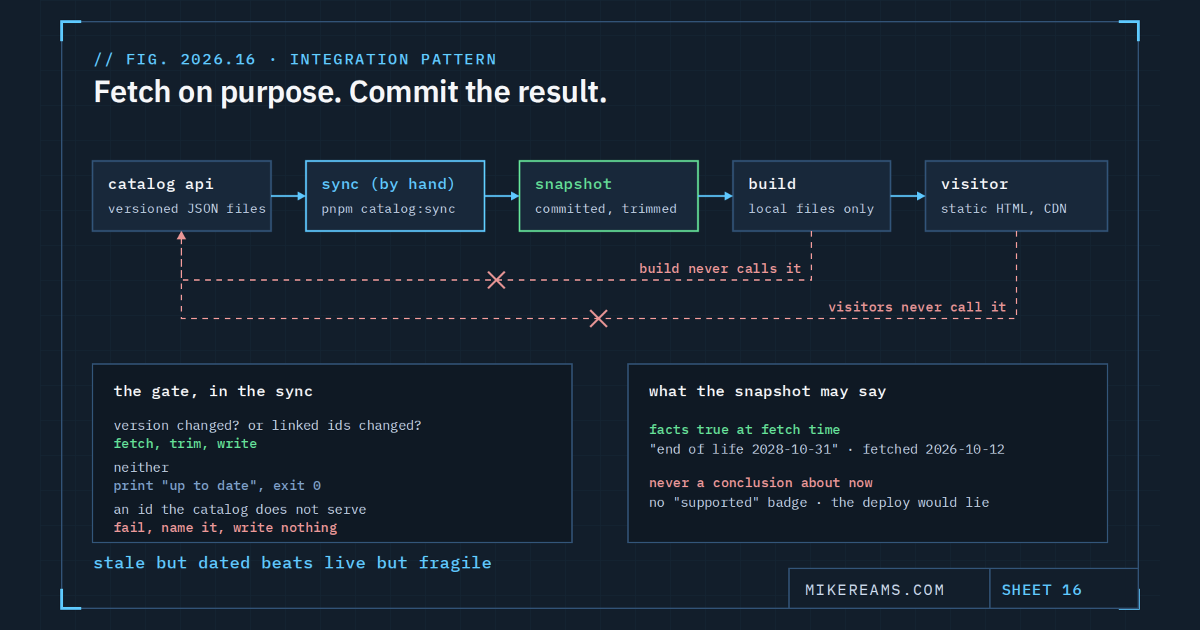
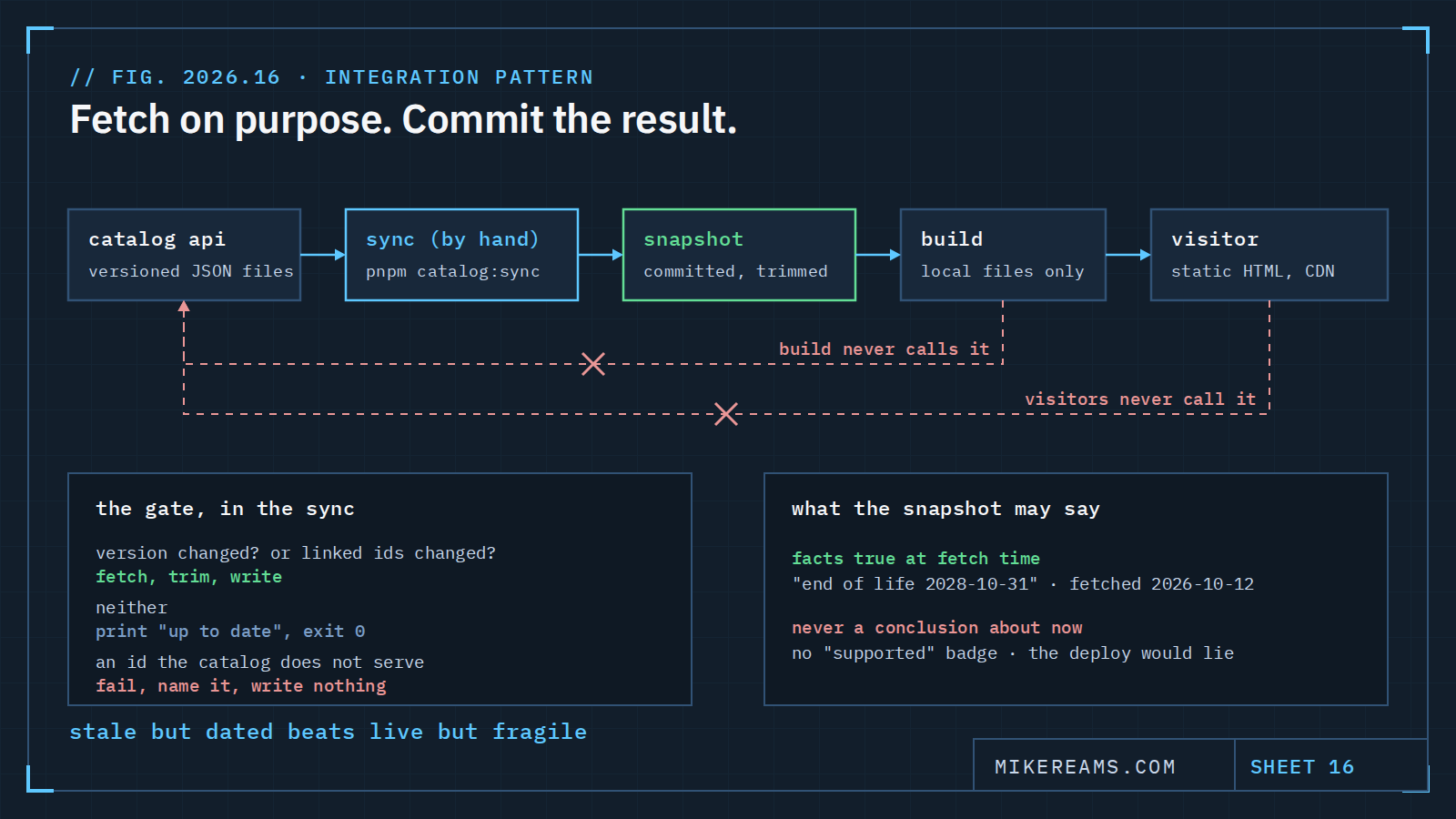
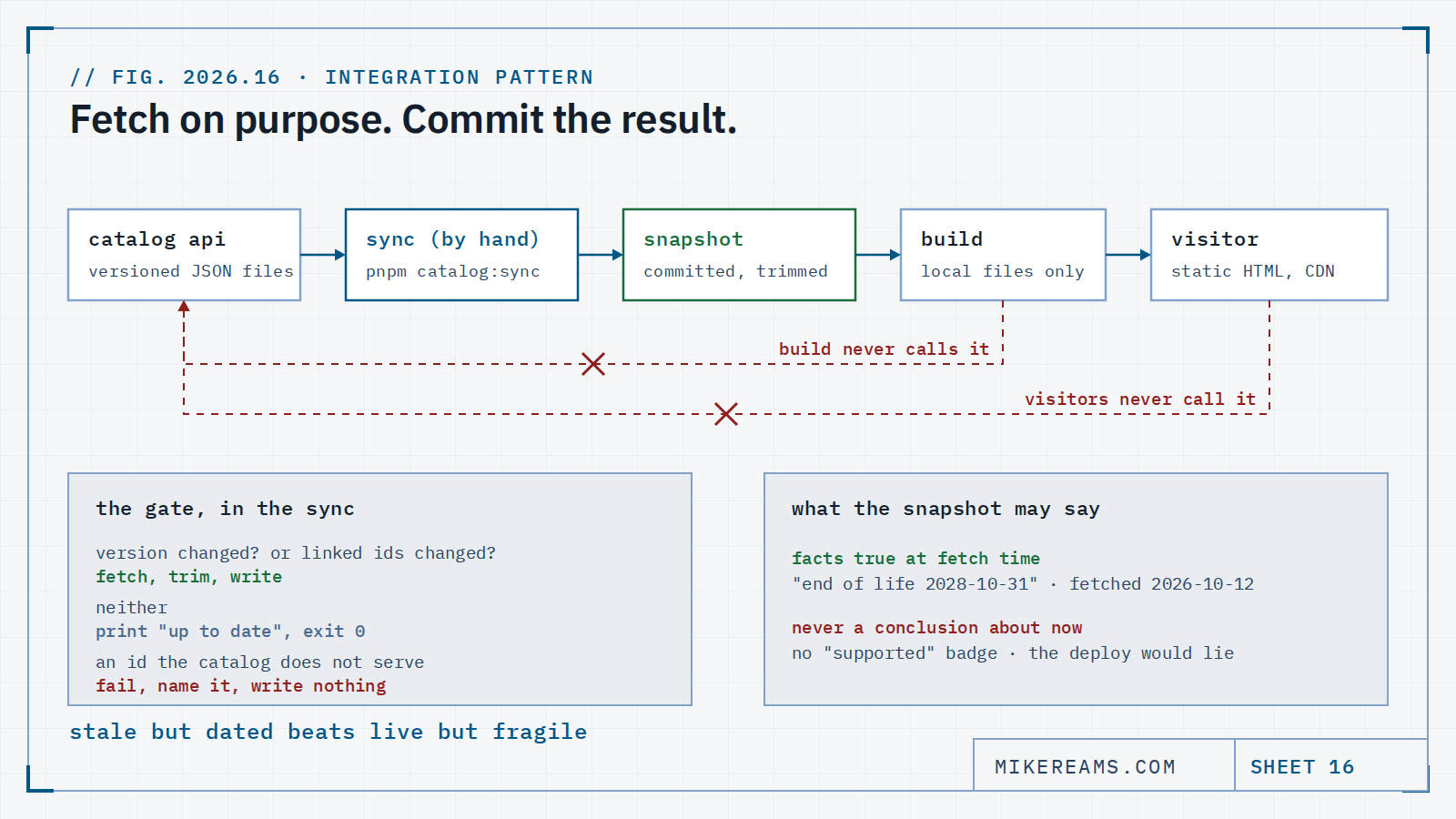
My site has a page that lists more than 200 technologies and another that reviews close to 50 architecture tools. Both now show data from a second site I run, the Blueprint Catalog: vendor, licence model, product capabilities, release and end-of-life dates. The pages are static files on a CDN. They have never made a request to the catalog, and they never will.
That sentence is the whole pattern. The rest of this post is how to get there without giving up freshness, and what the shape buys you that a fetch at build time does not.
The two easy answers, and why I passed on both
The first easy answer is to fetch at build time. The build pulls products.json from the catalog and renders it. It is one line of code and it is how most sites consume an API. It also makes the build depend on the other site being up, fast and unchanged at the exact minute the build runs. When the API is down, your deploy is down. When the API changes a field, your deploy is the first place you find out. When the API is slow, you pay for the retries in build minutes.
The second easy answer is to fetch in the browser. The page ships empty and JavaScript fills it in. Now every visitor makes a request to a domain they did not type, the content is invisible to anything that does not run scripts, and the page jumps when the data lands. For a portfolio site whose entire point is that it is readable by people and agents alike, that trade is backwards.
Both answers treat the API as live infrastructure. A personal site does not need live infrastructure. It needs the right data, checked in, with a known date on it.
The shape: a committed snapshot and a hand-run sync
Here is what I built instead. It is small enough to describe in full.
- A sync script you run on purpose. pnpm catalog:sync is a Node script with no dependencies. It reads the catalog's version.json, compares the version with the one in the committed snapshot, and compares the set of ids the site links with the set the snapshot holds. If neither changed, it prints one line and exits. If either changed, it fetches the three files it needs and rewrites the snapshot.
- A trimmed snapshot in the repo. content/catalog-snapshot.json holds only the records the site links, and only the fields the pages render. As I write this, the catalog publishes 32 products with 293 capabilities and 2,226 business capabilities; the snapshot holds 7 products, 25 technologies, 3 patterns and 10 books. It is a few hundred lines and it reads in a pull request like any other content change.
- A join key on my side. Each linked entry in my own content files carries an optional catalog_id. The catalog knows nothing about my site, which means the catalog can be reused by anyone and my site can stop using it without a conversation.
- A build that reads local files only. pnpm build never runs the sync. The Netlify build has no network dependency on the catalog, and a visitor's browser makes no request to it. The only thing in the chain that touches the network is the sync, and a person runs it.
The catalog's licence is CC BY 4.0, so every panel that shows its data carries the credit and the version it came from. Attribution is a field in the snapshot's envelope, not a string I typed.
Fail loudly, in the right place
The interesting decisions are about failure. A snapshot that quietly drops a record is worse than no snapshot, because the page keeps rendering and nobody looks.
So the sync fails if any linked id is missing from the catalog, names every missing id, and writes nothing. The content tests fail if a catalog_id is not in the snapshot, which catches the case where someone adds a link and forgets to sync. The content tests also fail if the snapshot holds an id nothing links, which catches the opposite drift. Three checks, each with a one-line error that says what to run.
The failure happens on my machine or in CI, where there is a person and a diff. It never happens on the CDN, where there is a visitor and a blank panel. That placement is most of the value of the pattern. The data can be wrong, but it cannot be wrong silently.
Show dates, not conclusions
The catalog republishes release lifecycles from endoflife.date, so my technology panels can say when Python 3.12 stops getting fixes. The obvious feature is a green or red badge: supported or ended. I did not build it.
A badge is a conclusion computed from today's date against data that only changes when I rerun the sync. The day after a cycle ends, every visitor sees a badge that is wrong until I notice. A date is not a conclusion. "End of life October 31, 2028" is true whether I synced yesterday or last quarter. Under it, a line says when the dates were fetched, so the reader can do the arithmetic I declined to automate.
The rule generalises: a snapshot may show facts that were true at fetch time; it may not derive facts about now. If a conclusion depends on the current date, either compute it at build and accept that a stale deploy lies, or show the inputs and let the reader conclude. For a site that deploys when I merge, the second is the honest option.
Where the pattern stops
This is not a cache and it is not a replacement for an API. It fits when the data changes on the order of weeks, when a human already reviews the site's changes, and when stale-but-dated beats live-but-fragile. It does not fit stock prices, inventory or anything a reader would act on within the hour.
It also moves a chore onto a person. Someone has to run the sync. I made that cheap: the script is idempotent, prints what changed, and the catalog's own CI tells me when it ships a version that touches my ids. The chore is one command every few weeks, with a diff to read. That is a trade I will take over a build that fails at 2 a.m. because someone else's DNS blinked.
Copy this
If you want the pattern for your own site, the parts are:
sync script   reads <api>/version.json; refetches only when version OR the set of linked ids changed
snapshot      committed JSON, trimmed to linked records and rendered fields, with the source's
              version, built_at and licence in an envelope
join key      an optional <source>_id on your own content; the source stays ignorant of you
build         reads the snapshot only; never runs the sync; visitors never call the source
fail loudly   sync: unknown id -> error naming it, write nothing
              tests: id not in snapshot -> fail; snapshot id nothing links -> fail
dates         show fetched_at and source dates; never compute 'supported' or 'current' at runtime
credit        render the licence from the envelope next to the data
The implementation on this site is in the repository's TECHNOLOGY guide, and the catalog documents what the site depends on in its own consumers file, with CI that fails if a linked id stops resolving. Two sites, one contract, no shared runtime. That is the part I would keep even if everything else changed.